
Things I wish I had known before deploying W365
Over the last few months, I’ve spent some time deploying a large number of W365 Cloud PCs. Now, in the production environment, I’m facing some challenges that I didn’t encounter during testing. In this blog post, I’m gonna list some points that I wish I had known before. I hope this helps you avoid making the same mistakes I did. 
Reprovisioning = New client
When you use the cloud pc as a development environment, you need to reprovision the clients from time to time to get a fresh start. Well, reprovision means, that you will get a brand new client. That means new hostname, new IP and new Entra-ID object. So you need to push back these changes in things like Firewall, Asset Database, etc. Keep that in mind, if that could affect you. As an alternative, maybe you can use the restore points.
Key Learning: If hostname or IP matters, reprovisioning will hurt you.
You cannot change the provisioning policy for existing Cloud PCs
In my environment, I have different provisioning policies for different use cases. Everything worked great until one day I got a request: a specific user group should be moved to a new Windows version. This should also apply when reprovisioning and for new cloud PCs. Unfortunately, this user group was only a small part of an existing provisioning policy. So I can’t change the entire policy to use a new Windows image… and existing Cloud PCs can’t be moved to a new policy. The only option left is to do the reprovisioning with the old image and perform the OS upgrade afterwards (which takes a lot of time).
In our case, we modified the reprovisioning process so that the old client is removed and the new client is added to a new provisioning policy… also not great, because with that solution, you have some parts of the user groups in the old provisioning policy and some in the new…
Key Learning: Plan your provisioning policy architecture carefully! Keep in mind your user groups and OS delivery strategy.
Naming template is limited
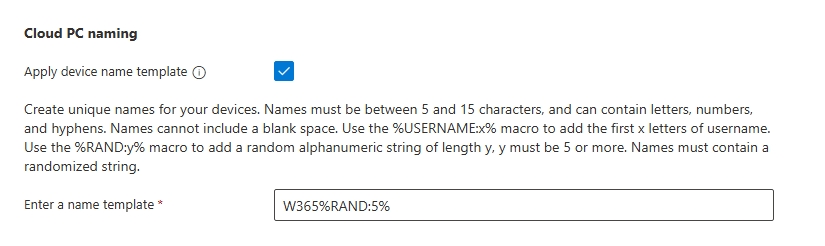
In the provisioning policy, you can choose the naming template for the Cloud PCs. Unfortunately, you cannot let your creativity run wild, because the template options are limited. The name can be between 5 and 15 characters. Also you can use some placeholders like %rand%, but the randomizer uses all numbers and letters and needs at least 5 random characters… So if the naming template of your company requires something else, get ready for some funny discussions. 
Key Learning: Check if W365 naming template matches your company hostname template. If not, find a compromise.
No maintenance window
If you’re using Citrix CVAD or AVD, you will be familiar with maintenance / drain mode. Clients in this mode cannot be accessed. There is no maintenance mode in W365. Therefore, if you are deploying updates or new software and want to ensure that users cannot cancel or interrupt the installation / update process, you need to prevent them from logging in to the Cloud PC.
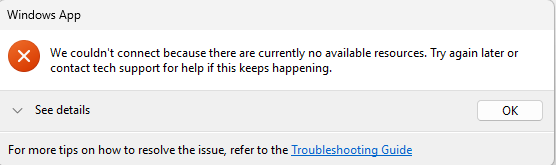
Best solution for us is to stop and disable the RDAgentBootLoader process before the update and start it after the maintenance. This solution is not ideal, because your monitoring system could throw some alerts. Also, I cannot imagine that this workaround is supported by Microsoft. But right now I haven’t a better solution. If you have one, please let me know. 
Key Learning: Check if user logon breaks your maintenance process. If yes, disable the service and check the alerting.
Check the available IP’s

This one is important, if you’re using your own Azure network connection (I don’t know if it’s the same with Microsoft hosted networks). As soon as you deployed your first W365 client to the configured subnet, you cannot modify the subnet anymore. Some W365 actions need additional IP adresses, like reprovisioning or even resizing (for whatever reason). So plan your network carefully, that you are not running out of IPs.
Key Learning: Plan with enough IP addresses! Subnet resizing is not possible afterwards.
Hve I missed something or do you have any tips and tricks for me? Please reach out to me on my social channels.